Category: General Operation

Articles that discuss general field sprayer operation and productivity factors

  • Sprayer Math for Banded Applications

    Sprayer Math for Banded Applications

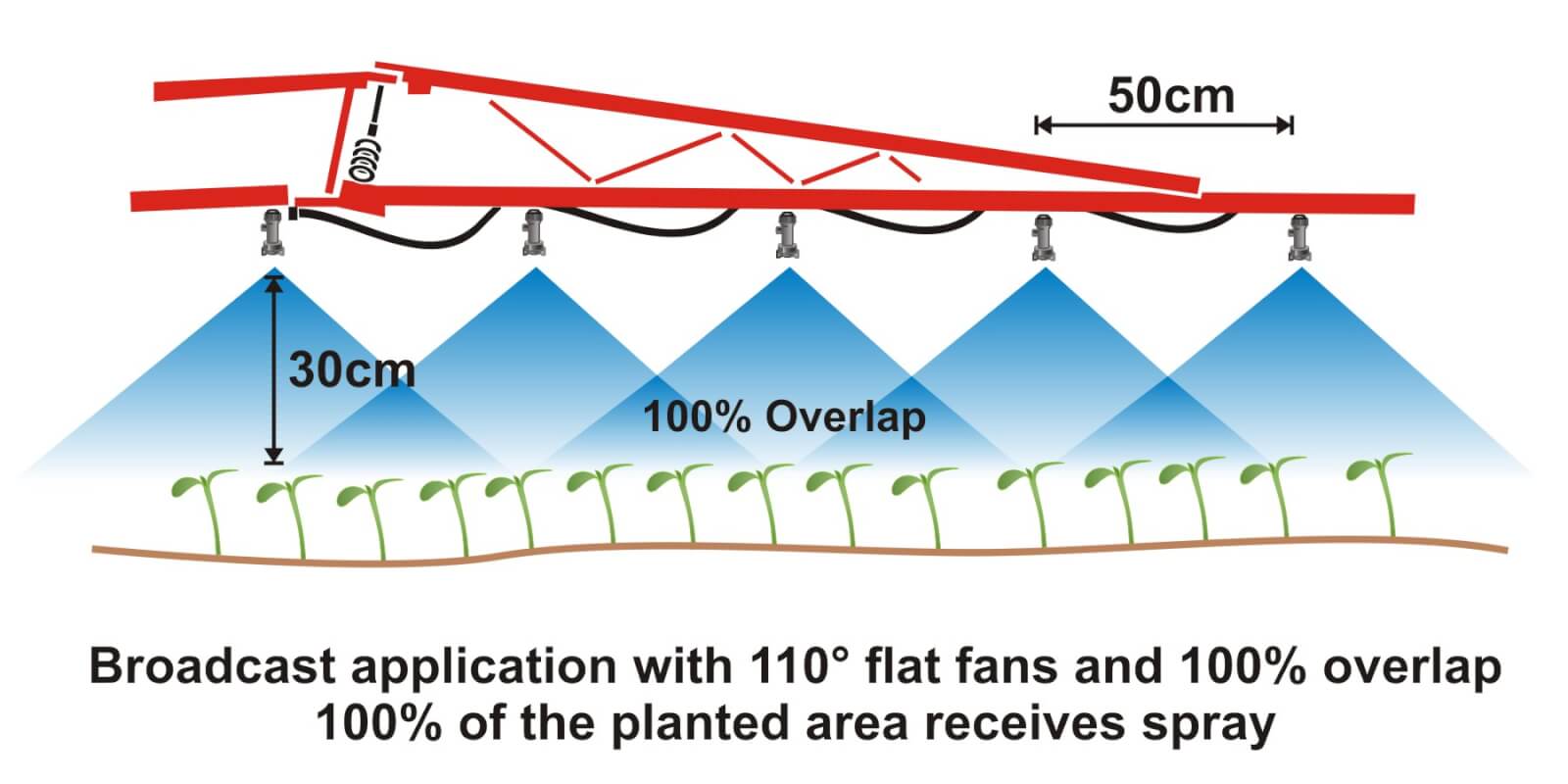
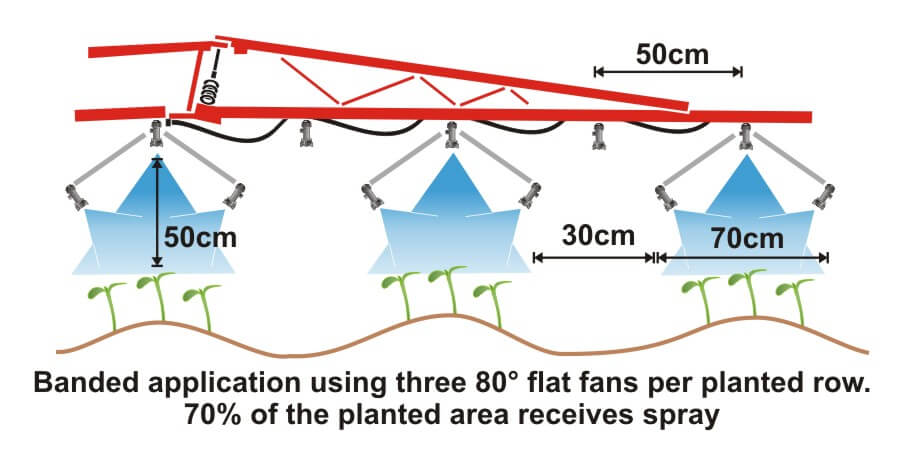
    Where crops are planted in rows, growers can save on chemical costs and reduce potentially wasted spray by performing banded applications. A banded application is treating parallel bands (Figure one), unlike a broadcast application where the entire area is treated (Figure two). This means only a portion of the field or orchard/vineyard floor receives spray, so the total amount of product applied per hectare (or per acre) should be less for banded than for broadcast.

    Figure 1
    Figure 1
    Figure 2
    Figure 2

    Banded applications are used in many situations, including:

    • Applying herbicides right over a crop during planting, both for pre-emergent or post-emergent crops.
    • Applying insecticides/fungicides by “directed spraying” using drop hoses or row kits; the latter is pictured in Figure three.
    • Carefully spraying herbicide between the rows to control weeds in the alleys of an established crop (Figure one).
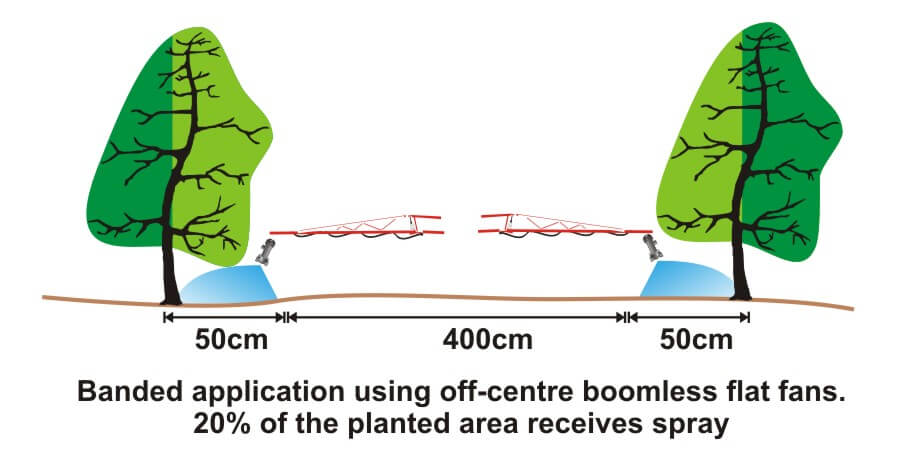
    • Applying herbicide under fruit trees or grape vines to control weeds (Figure four).
    Figure 3
    Figure 3
    Figure 4
    Figure 4

    It’s easy to make mistakes when calculating product rates for banded applications and these can be costly errors: too little means poor control and too much means wasted product and possible crop injury. This article describes how to calculate sprayer output and product rate for common banded applications.

    Step One: Determine broadcast volume

    Pesticide labels typically list broadcast product rates (e.g. amount of formulated product per hectare or acre). In this example, let’s say the label recommends a broadcast product rate of 500 ml of formulated herbicide applied using 100 litres of spray mix per hectare (i.e. added to 99.5 L water).

    Step Two: Establish sprayer settings

    Select a travel speed that is safe, gives decent efficiency and doesn’t compromise coverage. For this example, we’ll say the sprayer moving is at 8.0 km/h.

    Select a band width that completely covers the target row and some of the adjacent area where control is desired. Band width should be measured along the ground for soil-applied products or along the top of plants for post-emergence products. We’ll use Figure one for our settings: bands are 50 cm wide on 100 cm centres. We’ll say that a single nozzle swath can treat the band, and that we’re spraying 2 hectares of planted area.

    Step Three: Calculate the banded sprayer output

    We can calculate how much of the planted area actually receives spray using this formula:

    [band width (cm) ÷ row width (cm)] x total planted area (ha) = actual sprayed area (ha)
    [50 cm ÷ 100 cm] x 2 ha = 1 ha

    For completeness, here’s the US formula:
    [band width (in) ÷ row width (in)] x total planted area (ac) = actual sprayed area (ac)

    From this we now know that we should be able to go twice as far on a tank spraying a banded application as we would a broadcast, because we’re only spraying half the planted area.

    Step four: Calculate the nozzle output

    Use the following formula to convert the broadcast output into the banded output:

    [broadcast output (L/ha) x travel speed (km/h) x (swath width (cm) ÷ number of nozzles per swath)] ÷ 60,000 = nozzle output (L/min)
    [100 L/ha x 8 km/h x (50 ÷ 1)] ÷ 60,000 = 0.67 L/min

    For completeness, here’s the US formula:
    [broadcast output (gal/ac) x travel speed (mph) x (swath width (in) ÷ number of nozzles per swath)] ÷ 5,940 = nozzle output (gal/min)

    If multiple nozzles were contributing to the swath, such as in figure three or figure four, this formula will account for it. You still mix the labelled product rate at a ratio of 500 ml of herbicide to 99.5 L water, but as we determined in step three, we should be able to spray twice the planted area using a banded application as we would a broadcast application.

    Warning! Watch your units. You may be familiar with other formulae for calculating your output. Do not mix and match formulae or parts of formulae. For example, here is another Metric option for determining L/min. It employs different units so it requires a different constant:

    [broadcast output (L/ha) x travel speed (m/min) x (swath width (m)) ÷ number of nozzles per swath)] ÷ 10,000 (m2/ha) = nozzle output (L/min)

    Step Five: Use the nozzle catalogue to find the right nozzle

    Using a nozzle manufacturer’s catalogue, select a nozzle that gives the desired spray quality (usually coarser for herbicides) and will produce the 50 cm swath we’re looking for (which can be adjusted a little using boom height). Always choose to operate a nozzle in the middle of its pressure range.

    Step Six: Calibrate the sprayer (i.e. double-check)

    Follow your typical calibration process and make minor adjustments until the nozzle discharge per minute results in the desired banded output. A rate controller will handle this on larger sprayers, but if you don’t have one you can make small adjustments to speed and pressure until the desired output is achieved. Ideally, if your math was right, these changes won’t be needed.

    When performed correctly, banded applications are a great way to focus your efforts on the target, saving time and money.

    Here are a few additional resources if you’d like to learn more, or work with a few online calculators:

  • Exploding Sprayer Myths (ep.4): Speed Spraying

    Exploding Sprayer Myths (ep.4): Speed Spraying

    All set for Star Wars VII
    All set for Star Wars VII

    With due respect to Mickey and Mr. Lucas, and the massive hype surrounding Star Wars Episode VII, we felt we should jump on the bandwagon. Here’s episode IV in our series of short, educational and irreverent videos made with Real Agriculture.

    If there’s a single take-home message in this episode it’s this:

    …may the force be with you – always.

  • Exploding Sprayer Myths (ep.12): The Buffer Zone

    Exploding Sprayer Myths (ep.12): The Buffer Zone

    In this episode of Exploding Sprayer Myths we reduce a complicated best practice to black and white… literally. Watch as Jason and Tom get a creepy lesson in the do’s and do not’s of no-spray areas. Under the watchful eye of Dr. Jim Todd (OMAFRA Industrial Crops Specialist and Rod Serling cos-player), brace yourself as you enter The Buffer Zone.

    Learn more about how vegetative filter strips mitigate runoff on this Health Canada webpage.

    Thanks to the staff at the Simcoe Resource Station and to RealAgriculture for making this video possible.

    And if you’re curious about the kitchen-appliance cameo, you’ll have refer back to earlier episodes.

  • ExactApply: How to add “Section Flow %” Module to Run Screen

    ExactApply: How to add “Section Flow %” Module to Run Screen

    The John Deere ExactApply system has a pulsing feature, more commonly known as “Pulse Width Modulation” (PWM). From the operator’s perspective, it’s important to know the Duty Cycle that the system is operating at. The Duty Cycle (DC) is the percentage of time that the pulsing solenoids are “on”, or flowing. At the average travel speed, the pulsing system should operate at 60 to 80% DC for optimum performance. For in-depth explanation of ExactApply, read here.

    Unlike its PWM counterparts (Raven Hawkeye, Capstan Pinpoint), the new John Deere 4600 monitor does not display the DC by default. Fortunately, it offers a module for insertion to its run pages.

    The module isn’t perfect, and inserting it into an active run page is torture.

    Here is how to bring this module onto a 4600 screen:

    1. On 4600 Monitor, click on “menu” (bottom right).

    2. Select “Applications” tab.

    3. Choose “Layout Manager”.

    4. Edit Run Page Set.

    5. It’s easiest to copy an existing Run Page, rename it, and then customize its modules.

    6. Make room on new Run page for new module. On my copy of the “Spraying” run page, I’ve deleted a module on the bottom left that I have elsewhere. Now “Add Module”.

    7. Select “Machine Settings” tab, then “Boom & Nozzles”.

    8. Scroll down to “Section Flow %” (four windows) and “Add Module”.

    9. Module is placed in available open area. There is a warning if not enough screen space is available.

    10. Save new Run page. Make sure it’s part of the “Active Run Page Set” in Layout Manager so it’s available to scroll to while spraying.

    The module is a bar graph that gives you relative DCs along boom. In the first example, we’re driving straight and everything is fine. After a couple of shoulder checks, we pull out the smartphone and take a picture.

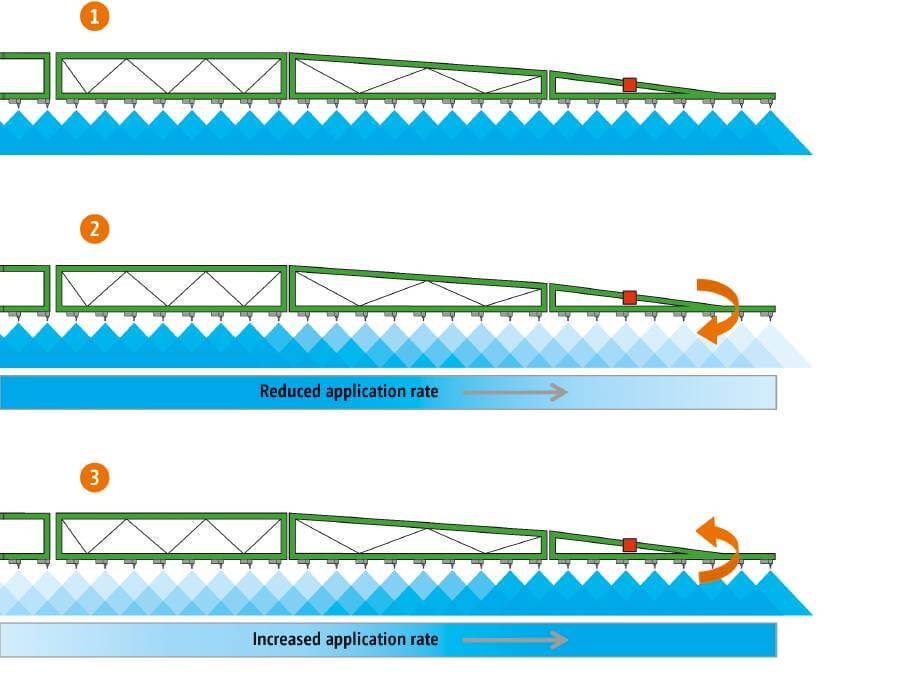
    The bar graph format is useful during turn (left in this example, forcing higher DC to outside of boom, the right).

    If it plateaus on outside (as in tight right turn, below), you are under-applying on the outside since the DC can’t go higher than 100%. Slow down and that improves it because it lowers the duty cycle of the entire machine.

    Slowing down may cause too low a DC, resulting in over-application on inside of boom because the DC can’t be reduced below 15%.

    Remember, for Turn Compensation to work, make sure the box is checked (Menu|Boom & Nozzles|ExactApply Config/Spray Mode|Manual Setup|i|<down four screens>|Turn Compensation Check box). While you’re there, make sure the “Limit Minimum Flow %” is unchecked. This lets DC go down to 15%, from 25%. 

    Happy Pulsing!

  • The Capstan EVO: PWM for the masses

    The Capstan EVO: PWM for the masses

    Capstan Ag brought Pulse Width Modulation (PWM) to spraying in the mid 1990s. Over the past 20 years, it has become commonplace on Case sprayers as AIM Command and AIM Command Pro, and as an aftermarket product, called Sharpshooter or PinPoint, on any brand sprayer. If you’re new to the concept, read about it here and here.

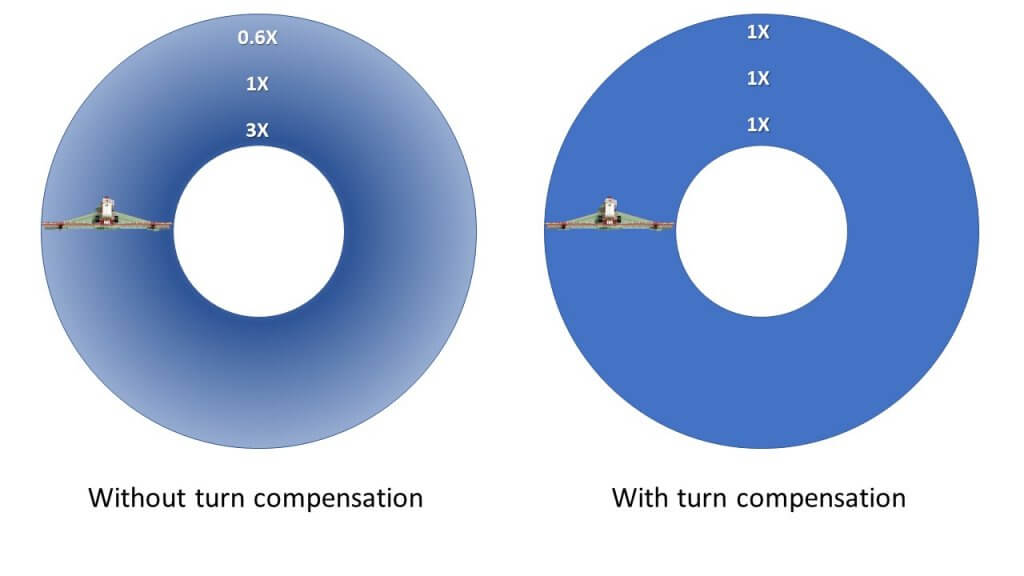
    A sprayer turn, without turn compensation. Note the darker dye on the innermost nozzles and lighter deposits on the outer wing.

    The latest versions (AIM Command Pro and PinPoint) offer turn compensation and individual nozzle sectional control. But there remains a large base of older AIM Command units that lack turn compensation. And of course, sprayers that lack PWM alltogether, possibly because of cost.

    The Capstan EVO addresses both issues. Introduced in January of 2019, it gives older AIM Command units affordable turn compensation. As a bonus, a complete new EVO install on non-PWM sprayers is available at a significant discount compared to most other PWM products.

    EVO features many of the same basic PWM capabilities as its bigger cousins, but with a shortcut, explain Capstan representatives.

    As always, a change in travel speed changes the duty cycle of the pulsing solenoid, adjusting flow rate of the nozzle without a change in pressure. This provides the consistency in performance that we love about PWM. Drift or coverage are controlled by the operator who makes changes to spray pressure from the cab, with a commensurate background adjustment in duty cycle so that travel speed is unaffected.

    With the EVO, the shortcut is that sectional control is by plumbed section. Technically it’s possible to add sections, but the rate controller and the sprayer wiring would have to allow it.

    Spray dosage for sectional turn compensation for six sections of equal size, with the centre of each section applying the target dose. As always, some lateral movement of spray from adjacent nozzles will occur.

    Turn compensation is part of EVO, and this is an important benefit that was previously only available in more expensive versions of a PWM product. Each section will have a fixed turn compensation based on the speed of the centre of the section. Its performance will depend on the size of the sections.

    For a 100′ boom with six 10-nozzle sections turning around an object with a 60′ diameter, our modelling shows that the deviation from perfect turn compensation is least on the outer wings (where it’s most important) and grows towards the inside of the turn. In this example, the outer section’s end nozzle under-applies by 6% relative to the ideal, and the innermost nozzle on this section over-applies by 7%.

    On the next section, these deviations are 7% under and 8% over, then 8% under and 9% over.

    Moving from the centre of the sprayer to the inner wing, deviations are 9% under and 12% over, then 12% under and 16% over, and finally 16% under and 24% over.

    Spray deposition on an un-compensated turn.

    On an uncompensated boom with the same dimensions, the outermost nozzle would be under-dosing 38% and the innermost nozzle would be over-dosing by 267%.

    Recall that it’s more important to be accurate on the outer wing than on the inner, for the purpose of delivering the full spray dose in a turn.

    Repeated year-after-year under-dosing at the periphery of a turn such as field corners, or around permanent features such as sloughs, trees, or stone piles results in weed problems.

    EVO is intended for users with an original SharpShooter or AIM Command who would like turn compensation but don’t want to a whole new PWM system. EVO provides new modules and a new screen, but users save money because they can keep their existing solenoids, says Capstan.

    Capstan says that EVO is for every brand of sprayer ordered without pwm control from new to 15 years old. It’s an easy upgrade for owners of AIM Command & SharpShooter systems because these already have most of the components, and install times are therefore lower for these machines. Existing solenoids and wiring harnesses can be retained.

    Owners of high clearance pull type sprayers will also see the advantage of turn compensation and pressure control at an attractive price point.

    EVO modules and tools needed for installation

    I was present during an installation of these new modules on an existing Case 3330 sprayer with AIM Command. It took one person, with occasional assistance from a second, less than 1 h to do the conversion.

    Removal of AIM Command modules
    Installation of EVO board containing all modules and replacement plugins

    A new installation would require an additional several hours to install wiring harnesses and solenoids. Times will vary with sprayer model and technical experience of the installers.

    The EVO electronics run in parallel to the existing sprayer monitor. It allows the existing monitor to control sections and determine the flow requirements. It does not control pump speed, it simply reads the flow, pressure, and gps signal from the sprayer’s systems and uses them to determine the duty cycle (DC) that ensures the spray pressure remains constant. On AIM Command units, the pressure control module remains installed and pressure adjustment remains possible through AIM Command in cab controls.

    Entering system settings into new EVO monitor

    It’s possible to set the pulsing frequency between 3 and 30 Hz in EVO, an industry first. The lower the frequency, the wider the dynamic flow rate. Capstan advises to maintain a frequency above 10 Hz for spray operations. Lower frequencies may be used for fertilizer applications, where prescription maps require a higher rate range and where uniformity requirements are more relaxed.

    EVO Monitor contains an option in which to select pulsing frequency
    Testing of completed EVO Installation

    The monitor has an intuitive readout of average DC and a bar graph showing the DC across sections in a turn. If this bar maxes out on the outer sections during a turn, simply slow down to lower average DC and provide extra capacity to those sections.

    EVO monitor during operation. Readout includes current spray pressure, duty cycle, and turn compensation status.

    Lowering the cost of PWM makes it attractive to a new group of users. It also offers a more affordable upgrade path for owners of AIM Command or SharpShooter systems that currently do not have turn compensation.

    The cover says AIM Command, but the guts are EVO