Author: Jason Deveau

  • Drift is… Good?

    Drift is… Good?

    OK, fine. We confess to the shameful use of click-bait in our title. Nevertheless, it’s absolutely true: Drift can be good. The reason this statement is unsettling is because of the lack of context, which is really what this article is about.

    The majority of sprayer-related information available to ag stakeholders relates to horizontal boom sprayers. Most of it is relevant to broadacre field crops and often pertains to herbicide applications. If you’re unsurprised, or still struggling to grasp our point, it’s likely because you’re part of that world. But consider everyone else.

    Agricultural spraying is diverse and many usage patterns are grossly underrepresented. As a result, those operators struggle to find relevant information. And what information is most readily available? Yes – broadacre herbicide spraying. Even the experts (i.e. agronomists, salespeople and consultants) often make the error of responding to specialty crop questions with field crop answers. Or relatedly, they assume their entire audience is comprised of field croppers and fail to use a disclaimer before making sweeping statements. The problem (and it is a problem) is so pervasive that we often hear about specialty crop operators taking training courses intended for field crop applicators… because that’s all that’s available.

    So how different can spraying be for a given crop? Surely a droplet is a droplet and the laws of physics don’t care what you grow? This is true, but droplet size, spray volume, distance-to-target, environmental conditions, sprayer type and product formulation combine in complicated ways. The result is that the best advice for one operation can be disastrously wrong for another.

    Case in point: Drift is good. If we were persnickety (and we are) we would suggest that moderate drift is the lateral movement of spray with the prevailing wind, and that this helps ground and/or disperse spray in a predictable direction. It’s not a bad thing. But we know that drift quickly becomes bad in high winds and especially when there are sensitive downwind areas. We won’t even talk about dead calm.

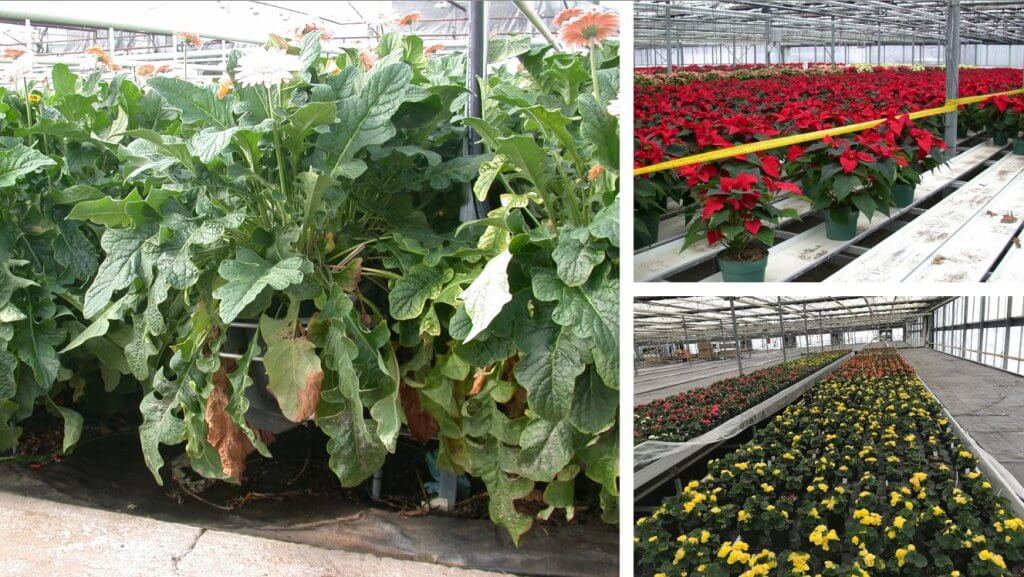
    However, in controlled environment applications (e.g. greenhouses) operators use very small droplets in high numbers and absolutely rely on air circulation to expose all crop surfaces to the spray. Without drift, most stationary foggers would only have a limited and localized effect. And in airblast operations, a wind that would never deter a field sprayer operator would derail an airblast operator. Wind is much faster with elevation and airblast sprayers use very small droplets that span considerable distances to the tops of tall targets. In their world, droplet size is not the primary means for drift mitigation – it’s air alignment.

    The following table is a relative comparison of key factors in spraying. Note how different they are depending on the usage pattern. And if this isn’t diverse enough, recognize that we didn’t include a column for vegetative management (e.g. roadsides, industrial and forestry) or aerial application (which might even be split into piloted and remotely-piloted).

    And so where does this leave us? We have two pieces of advice:

    • If you are looking for information on spraying, take the time to find out who your source is and understand the context of the information. More often than not it will have relevance, but in some cases it could be completely wrong for you.
    • If you are providing information on spraying, be clear who the information is intended for. While we don’t propose caveats amending every statement, context is always appreciated. A sentence in an article, or a brief interjection during a presentation, might help someone that doesn’t know what they don’t know.

    This presentation was delivered virtually for the 2021 OMAFRA Controlled Environment Webinar Series. If you’d like to learn more about strategies for spraying in closed environments, settle in and give a watch. It’s 45 minutes plus questions.

    So, a minor error in the presentation. The image of the ascospore was not quite right. This new version (below) is correct. Perspective can get tricky at the micron-scale of resolution.

  • Assessing Water Sensitive Paper – Part 2

    Assessing Water Sensitive Paper – Part 2

    This is part two of our three-part monster-article on methods for digitizing and processing water sensitive paper. You can read part one here.

    Image analysis software

    There are many choices of software designed to analyze digitized WSP images (E.g. Optomax, Stainalysis Freeware, DropVision, ImagePro Plus, DropletScan, AgroScan, DepositScan, UTHSCA ImageTool). Some were developed for aerial applicators to evaluate entire swaths and others to focus on single collectors. Some are more user-friendly than others, some cost money, and some are no longer supported. All of them employ algorithms (a set of rules a computer follows when making calculations) that often make image processing decisions. Sometimes these algorithms are pre-set, which can be convenient but may also restrict our analysis.

    ImageJ is a free, open-source application developed at the National Institute of Health by Wayne Rasband to adjust and analyze high-resolution images of small structures. There’s a variation called “Fiji” (Fiji Is Just ImageJ) which bundles ImageJ with tools specifically intended for biologists. Happily, they are equally valuable for analyzing WSP. The interface can be intimidating, but only because there are so many functions that we won’t be using. The learning curve is worthwhile because the user has complete control over the analysis.

    The ImageJ menu. Version 1.53e.

    Three steps to image analysis

    No matter the software, the operations used to analyze a digital image tend follow a three-step progression:

    1. Pre-processing: We select an ROI (a Region Of Interest) in the image and perform a few preliminary operations to improve image quality and contrast. In selecting a specific region, we can avoid unwanted flaws like drips or fingerprints as well as crop the image to some standard size for scaling purposes.
    2. Processing / Detection: Point and Morphological Operations are used to refine the image and establish a threshold so we can differentiate between deposits and the unstained background. The ideal outcome sees the original colour image converted to a binary (typically black and white) image.
    3. Measurement: We use ready-made computational routines to quantify some value. Typically, the percent area covered by deposits, but possibly the count and density of those deposits and perhaps even an estimate of the original droplet size.

    Let’s explore each of these steps.

    1. Pre-processing step

    Pre-processing establishes the scale of the image and allows us to isolate the specific region we want to analyze. Perhaps the water sensitive paper was folded during sampling and we want to analyze each half separately. Perhaps we want to avoid obvious imperfections that would interfere with our results. In some cases, pre-processing might also include adjusting the image brightness to improve the contrast between stains and the yellow background.

    Flaws and imperfections become obvious when water sensitive paper is examined under magnification. Part of pre-processing is to select a region of interest that represents typical coverage and does not include artifacts that might interfere with the analysis.

    2. Processing / Detection step

    Processing and detection can take time because of the degree of computation involved. The higher the resolution and the larger the ROI, the longer it will take. Depending on what you want to measure, it might be acceptable to sacrifice some accuracy for speed.

    We begin by determining which pixels represent part of a deposit stain and which represent part of the unstained background. We can accomplish this through global point operations called Thresholding and Filtering. If you haven’t already noticed, image analysis includes has a lot of jargon: “global” means the entire image and “point” refers to our focus on individual pixels. Ultimately each pixel is assigned one of two values, reducing the image to a binary (or 1-bit) format.

    Once we have a binary image, we explore the shapes of the deposits (which are sometimes referred to as objects) to determine the limitations of what we’re confidently able to measure. Morphological operations are used to refine or modify these shapes in order to smooth jagged edges and identify whether an object is the result of a single deposition or multiple overlapping deposits.

    3. Measurement step

    Depending on the image analysis software, the user may be limited in what they can measure. The spectrum ranges from a single value (usually percent area covered) to in depth data relating to each object in the image. The latter might appear in a pre-formatted report, or as a CSV (Comma Separated Value) file for further exploration in spreadsheet format.

    Thresholding

    A thresholding operation sorts all the pixels in an image by some characteristic, and then allows us to set a threshold dividing them into two camps. In our case, we want to divide them into “stained” and “unstained”. The process is almost like taring a scale, where anything above the weight of the container is identified as the weight of the contents.

    Thresholding is like taring a scale. Just as the weight of the container is isolated from the total weight of the container and contents, the stain colour is isolated from the background colour.

    The HIS thresholding operation

    ImageJ’s Colour Threshold operation is only one way to threshold an image, but it serves as a good example. This method uses HIS (Hue, Intensity and Saturation) to separate the deposit stain colours (blue-green) from the background colour (Yellow). As discussed, each pixel is represented by one or more 8-bit values. In this case pixels represent 0 – 255 hues, 0 – 255 intensities and 0 – 255 saturations. That may seem intimidating, but we mostly focus on hue.

    When the Colour Threshold operation is selected, ImageJ sorts all the pixel values in the image into a binned histogram (where the Y-axis is the pixel count and the X-Axis is the range of pixel values).

    a. Hue

    We begin by considering the hue, which is simply another word for colour. An image with no stains would produce a histogram with pixel colours producing a distinct peak in the yellow range. An image with stains would also display peaks in the blue-green range. The user then segments the background from the foreground by manually setting the threshold between these peaks.

    (Top) When the threshold overlaps the background yellow hue (set to 30 here), some portion of the background is falsely identified as a stain. (Bottom) When the threshold is adjusted to fall in between background hue and stain hues (set to 36 here), a sharper distinction is made.

    The hue thresholding process is less reliable (or can outright fail) when WSP has coverage in excess of 50%. This is because the color of the intermittent unstained areas changes as the distance between stains decreases. Think of it as blue bleeding into the yellow. The result is that the level of contrast between stained and unstained regions is inconsistent, making it difficult to confidently differentiate between “stained pixels” and “unstained pixels”. Similar issues arise when humidity causes the background colour to change but this tends to be more uniform and easier to threshold.

    If the hue threshold it is set too low, stains will appear smaller and lose their shapes. If it is set too high, stains will appear larger and the gaps between adjacent, separate stains can disappear. This can have a significant impact on deposit count and distribution assessments, resulting in the loss of thousands of tiny, distinct deposits. Threshold accuracy has less impact on the determination of percent area covered. Research has shown that the use of a single threshold for multiple papers gives an absolute error of +/- 3.5% area covered. This is considered well within the intrinsic variability of spray coverage data.

    b. Intensity

    Sometimes referred to as “Value”, intensity can be thought of as pixel brightness. No threshold is required here because capturing the entire 256 pixel value range improves the contrast between colours.

    c. Saturation

    Finally, saturation (a measure of the difference between red, green, and blue levels) is a useful thresholding adjustment when WSP has been exposed to humidity. Humidity does not affect WSP’s ability to resolve stains, but as we mentioned it can cause the background to take on an overall greenish hue. An increase in low end saturation limit can increase the contrast between the stain colour and a less-distinct background colour.

    When the HIS thresholds are set, ImageJ converts the pixels values closer to the foreground (stains) to black and those closer to background (yellow) to white. Users can invert this if they wish, or even make the stains red. The important part is that we now have a binary image that makes a clear distinction between the stains and the unstained background. Ideally, thresholding should be performed for each consistent set of samples.

    Learn how HIS thresholding is being used to perform weed recognition functions on sprayers in this article.

    This 2 cm x 2 cm ROI was HUI thresholded. You can double check your accuracy by having ImageJ “show outlines” which outlines and numbers each distinct object. Zoom in to see if any artifacts remain (or were inadvertently created) and go back to make minor thresholding adjustments if needed.

    Pixel filtering

    We won’t belabor filtering because it isn’t often required when analyzing WSP. Filtering operations compare pixel values to those of their neighbours and then replace those values with some form of weighted average. This reduces the relative differences between pixel values, smoothing the image and reducing noise (at the cost of lost detail).

    Last article –Part three: Morphological Operations and Interpretation.

  • Assessing Water Sensitive Paper – Part 1

    Assessing Water Sensitive Paper – Part 1

    This is not a typical article for www.sprayers101.com. We like to develop actionable, data-driven content written in an easily-read format. Some articles discuss the results of research, some describe best practices and techniques, and occasionally there’s a song parody. But this article is different.

    We recently wrote about the three commercially-available brands of water sensitive paper (WSP). The article was an impartial comparative evaluation of how these papers resolved spray coverage. But in order to be fair in our evaluation, we had to decide the best method for assessing them. This led us down a rabbit hole far deeper than we could have imagined. The science of image processing is complicated and there are many ways that WSP can be interpreted using a myriad of home-grown and commercial methods. We decided to share what we learned.

    Which method is best for you? How far should we take a tool that was originally developed for quick, subjective comparisons? What follows is a three-part primer in digitizing and analyzing water sensitive paper. If you’re a grower that has never used WSP, you need only read to the end of the next sentence. Buy it and try it. If you’re a consultant, a researcher, or just interested in wringing all you can from this excellent agronomic tool, then get comfortable.

    Here, in part 1, we’ll explore a brief history of WSP, describe a few limitations in what it is capable of resolving, and start down the road of how to capture a digital picture for later analysis. Welcome to the world of blob-analysis.

    Introduction

    Spray coverage describes the degree of contact between spray droplets and the target surface area. This metric can be used to predict the success of an application. One of the easiest methods for visualizing coverage is to use water sensitive paper, which is a passive, artificial collector that turns from yellow to blue when contacted by water.

    WSP is often used to evaluate iterative changes to a spray program. Placed strategically throughout a target canopy, or directly on the ground, achieving uniform, threshold coverage translates into improved efficacy, reduced waste, reduced off-target contamination and reduced risk of pesticide resistance development. WSP tends to underestimate the spreading effect that can occur on plant surfaces (especially when surfactants are used), but they are effective as a relative index.

    The simplest use of WSP, and the primary reason it was commercially developed, is to perform qualitative assessments. For example, when observers judge one paper to be visibly “bluer” than another, subsequent measurements have shown it can represent an increase of 20% in foliar deposit. In other words, if you can perceive a difference with the naked eye, it likely represents a biological impact. This fast and rudimentary use of WSP provides immediate and actionable feedback and is therefore valuable information for any sprayer operator. It has been suggested that manual counts become impractical at ~200 stains/cm2, but higher counts are possible using a loupe or linen tester-style lens.

    A loupe or folding linen tester (originally designed to check the quality of woven fabrics) provides 5-10x magnification to resolve smaller stains. Every deposit counts.

    WSP can also be used for in-depth, quantitative assessments. This requires a camera or scanner to produce a digital image of the WSP and specialized analytical software to extract the relevant data. Considerable research has been performed to establish the limits of what can be learned from WSP. The four pieces of information commonly sought are listed here from easiest and most reliable to hardest and least reliable (or arguably, impossible) to determine.

    • The percent surface area covered.
    • The density of deposits on the target area.
    • The size of the droplets that left the stains.
    • The dose applied to the target surface.

    This document will describe the fundamentals of image analysis and provide examples of commercial tools and protocols used to extract coverage data from WSP. It will also describe the assumptions and the limits intrinsic to these methods so the user can decide the degree of time and effort to invest versus the reliability of the results.

    A brief history of WSP

    In 1970, a journal article described a new method for sampling and assessing spray droplets. Photographic paper treated with bromoethyl blue created a yellow surface that changed colour when it encountered moisture. The pH-based reaction was fast and irreversible, leaving a distinct blue stain to mark the deposition.

    Ciba-Geigy Ltd. made water sensitive paper commercially available in 1985 (later as Novartis in 1996 and as Syngenta since 2000). It is produced in several formats, but aluminum foil packages of 50, 76 x 22 mm (1 x 3 in.) papers are the most popular. Odds are if you’ve ever used water sensitive paper, it originated from Syngenta in Switzerland. Recently, two new options have been made commercially available: Innoquest’s SpotOn Paper (United States) and WSPaper (Brazil).

    Once dry, the blue stains on WSP are irreversible and papers can be stored for a few years. However, unstained portions will continue to react to moisture from humidity, dew, or fingerprints, so care must be taken in their handling and storage. According to Syngenta, stains can be permanently fixed using isopropanol (or a similar solvent) to remove the yellow layer, leaving black stains on white paper.

    Limitations of water sensitive paper

    a. Minimum drop detection diameter

    In hot and dry conditions, not all droplets that contact WSP will leave stains. En route from nozzle to target, droplets can concentrate through evaporation, leaving insufficient water to stain the paper. Syngenta states that droplets <100 µm in diameter will not be reliably resolved in “tropical conditions”. For most conditions, their minimum droplet diameter is closer to 50 µm. Innoquest states that their minimum drop detection diameter, under most environmental conditions, is between 60 and 90 µm.

    This isn’t to say that smaller droplets can’t be detected. In absolutely ideal conditions, the smallest detectible droplet diameter for any brand of WSP is closer to 30 µm (Syngenta, Innoquest, SprayX – Personal Communication). Microscopic analysis of Syngenta’s papers reveals that droplets finer than this can leave physical “craters” on the surface, but have insufficient water to cause the colour change. The stain diameter created by a droplet is always larger than the droplet diameter, to a degree that is dependent on the spread factor.

    b. Spread factor

    The size of a stain is sometimes used to extrapolate the size of the droplet that produced it. The stain diameter is divided by a spread factor, which is determined under specific conditions. For example, Syngenta’s spread factors were established using the magnesium oxide and silicon‐oil‐method at 20°C and a 40% relative humidity for droplets at sedimentation velocity. “Sedimentation velocity” can be thought of as terminal velocity, which accounts for the fact that droplets moving at higher speeds will leave larger diameter stains. Consider the splash produced by a water balloon hitting a surface fast or hitting it slow.

    Spread factors are not constant for all droplet sizes. For Syngenta’s WSP, a 59 µm droplet is expected to leave a 100 µm diameter stain (a spread factor of 1.7) and a 285 µm droplet is expected to leave a 600 µm diameter stain (a spread factor of 2.1). This relationship is sometimes captured using calculus. One research article employed this formula: feDm = 0.74057 + 0.0001010399 × Dm + 0.02024884 × ln(Dm) (where fe is spread factor and Dm is stain diameter in microns). Volume was then calculated per: Vg = (π × Dg3) / 6 (where Vg is droplet volume in µm3 and Dg is droplet diameter in µm). Innoquest determined their spread factors to be [0.4508 × Ln(Observed Stain Diameter)] – 0.6221 (Personal Communication).

    Given that droplet sizing excludes the finest droplets, relies on situation-specific spread factors, assumes the droplet has reached terminal velocity and can be stymied by overlapping and elliptical stains (discussed in the next installment of this document) it is questionable whether there is any practical value in the exercise except perhaps for a relative comparison under highly controlled conditions.

    Digitizing WSP

    Digital images are produced using cameras or scanners. Cameras employ a grid of light-sensitive sensors, each of which reflect and record their portion of an image. Cameras capture images quickly but are prone to focus and distortion issues because the lens must be held very close to the WSP. SprayX’s DropScope accounts for this by individually calibrating each unit to compensate for variation during assembly and by employing software to account for lens distortion. When high resolution is required, cameras are the more expensive and complicated option. However, when resolution is not an issue, even a smartphone camera can be used (as with the SnapCard app; which as of 2026 may no longer be available).

    Flatbed scanners press multiple papers against a glass platen fixed above the light-sensitive sensors. This minimizes potential focus issues. Compared to cameras, scanners experience less distortion because they do not use a fixed grid of sensors. Instead, they rely on the speed and consistency of a carriage motor that draws an array of sensors along the image, capturing discrete slices. Scanners are less expensive than cameras, but they are much slower and low-end varieties can sometimes skip tiny slices of the image. This is not an issue when scanning office documents, but it can cause problems when analyzing a high resolution image.

    a. Pixels

    A pixel (a contraction of Picture Element) is the numerical information recorded by a light-sensitive sensor. The word “digitizing” means “converting to numbers”. The most rudimentary pixel value is an eight digit (or 8-bit) number. Each bit is either a 1 or a 0, so each pixel value is one of 28 (that’s 256) possible unique combinations. A picture displayed as a grid of 8-bit numbers wouldn’t make sense, so the computer substitutes shades or colours according to a look-up table.

    Today’s sensors report higher pixel values to give more depth to the digitized image. An RGB (Red, Green, Blue) image records separate 8-bit values for red, green and blue colours. That’s 2563, or 16,777,216 possible unique colour combinations for a single 24-bit pixel.

    With such a nuanced spectrum, two colours might look the same to the naked eye but represent different pixel values. Therefore, image analysis is more precise when we can work with the pixel values (the actual numerical data) and not shades or colours (an interpretation of the data).

    (Left) A digitized scan of water sensitive paper. (Middle) Zoomed in on a single deposit. (Right) Extreme zoom to show the actual pixels, both as look-up table colours and as 8-bit pixel values. The colours may appear similar, but the actual pixel values are different.

    b. Resolution (scale)

    Before we can analyze an image, we must first know the scale. Each pixel is the smallest element in a grid that makes up the digital image. The scale of the image determines the real-life size that each pixel represents, making it possible to calibrate size measurements. We often refer to image resolution in Dots Per Inch (DPI). In this case, “dots” refers to pixels. The higher the DPI, the higher the resolution as the diameter of each pixel represents a smaller real-life length.

    Camera resolution is described in terms of megapixels (MP) where 1 MP represents a grid of light-sensitive sensors capable of producing a 1 million-pixel area. When planning to print an image, the convention is to use a minimum resolution of 300 pixels per inch. For example, a standard 8 x 10 in. print would need 2,400 x 3,000 pixels for a total area of 7.2 million pixels. This would require a 7.2 megapixel camera.

    The area we are dealing with is typically less than the entire 1 x 3 in. paper. Even if we captured the entire paper, a 1 MP camera would provide 600 pixels per inch, or approximately twice the resolution required for a typical 8 x 10 in. print. That may seem sufficient, but remember we are examining the image very closely, which would be similar to blowing the print up to the size of a billboard. For reference, the SprayX DropScope uses an 8 MP camera. The iPhone 7 camera used to capture SnapCard images for this document is 12 MP.

    So, what is the ideal resolution and what are the downsides of getting it wrong? A low resolution image has a low pixel density, which might cause us to see multiple deposits as a single deposit or to miss the smallest deposits entirely. The minimum diameter of a detectable deposit must be about the same as the imaging resolution. For example, if a pixel represents a 30 μm diameter, the smallest deposit we could reliably resolve would be about the same size. Software that registers deposits sizes less than the limit of resolution are likely due to an algorithm error and should be ignored.

    (Left) The scale of the original image is known. (Middle) A close-up of a low resolution image with pixels calibrated to scale. Is this a single stain or a cluster of multiple stains? (Right) A close-up of a high resolution image with pixels calibrated to scale. It is easier to see this is likely a single deposit.

    This is further complicated by stains that lie at an intersection overlapping multiple pixels. In this case, more than one pixel might represent a colour that is blue enough to register as stained, reporting a larger deposit than was actually there.

    Resolution errors. (Left) Low resolution can cause pixels to misrepresent small, discrete deposits as a single, large stain. (Middle) Pixels may not reflect deposits smaller than their diameter. (Right) Multiple adjacent pixels may falsely represent a single, smaller, intersecting stain.

    It is tempting to go to the highest resolution possible, but this can also cause problems, such as detecting and misidentifying inconsistencies in the surface texture of the paper as stains. Additionally, high-res images create logistic issues; They take longer to scan and to process as well as create large files that take up a lot of storage space. Image formats (e.g. JPEG) can compress the image file to make it smaller, but data is lost. Other formats (e.g. TIFF, PNG, BMP) are not as efficient at saving space, but they preserve the original data and are therefore preferred.

    We suggest that 10 µm : pixel provides enough resolution, a reasonable processing time and a manageable file size. Further, given that a deposit could overlap multiple pixels, we propose employing a filter that removes any deposits less than a three pixel, or 30 µm, span. This lower limit eliminates artifacts and is still smaller than the smallest stain WSP can possibly produce. Some software allows the user to set this limit, and some make the choice on our behalf.

    Next article: Image analysis software and thresholding.

  • Comparing Water Sensitive Paper Brands

    Comparing Water Sensitive Paper Brands

    Introduction

    Spray coverage describes the degree of contact between spray droplets and the target surface area. This metric can be used to predict the success of an application. One of the easiest methods for visualizing coverage is to use water sensitive paper (WSP), which is a passive, artificial collector that turns from yellow to blue when contacted by water.

    WSP is often used to evaluate iterative changes to a spray program. Placed strategically throughout a target canopy, or directly on the ground, achieving uniform, threshold coverage translates into improved efficacy, reduced waste, reduced off-target contamination and reduced risk of pesticide resistance development. WSP were also used to develop a system that measures the area covered by the effective radial distance in an attempt to relate the area covered by a stain to a larger area where sufficient pesticide activity is taking place.

    WSP tends to underestimate the spreading effect that can occur on plant surfaces (especially when surfactants are used), but they are effective as a relative index.

    A brief history of WSP

    In 1970, a journal article described a new method for sampling and assessing spray droplets. Photographic paper treated with bromoethyl blue created a yellow surface that changed colour when it encountered moisture. The pH-based reaction was fast and irreversible, leaving a distinct blue stain to mark the deposition.

    Ciba-Geigy Ltd. made water sensitive paper commercially available in 1985 (later as Novartis in 1996 and as Syngenta since 2000). It is produced in several formats, but aluminum foil packages of 50, 76 x 22 mm (1 x 3 in.) papers are the most popular. Odds are if you’ve ever used water sensitive paper, it originated from Syngenta in Switzerland. In 2023 I noticed that the papers now say “made in Germany.”

    Change of manufacturing location?

    In recent years, two new options have been made commercially available: Innoquest’s SpotOn Paper (United States) and WSPaper (Brazil). At the time of writing, there has been no impartial comparative evaluation of these three products.

    Once dry, the blue stains on WSP are irreversible and papers can be stored for long periods of time. However unstained portions will continue to react to moisture from humidity, dew, or fingerprints, so care must be taken in their handling and storage.

    Comparing WSP brands

    The three commercially-available brands of WSP were subjected to a series of comparisons. The intention was not to rank these products, but to determine if they performed in a similar fashion and to alert users to any significant differences.

    Packaging and Appearance

    Each package was donated for the study. The SpotOn (SO) papers had a “sell-by” date of November 2023, the Syngenta (SY) papers (provided via Spraying Systems Co.) were dated February 2021 and the WSPaper (WS) was their newest formulation (white package, not silver), received June 2021. The comparison was performed on July 5, 2021.

    WSP packages.

    Each product was a foil or plasticized bag of 50, 26 x 76 mm papers. SO and WS had a re-sealing feature similar to that of a sandwich bag. SO also included a package of silica gel desiccant to capture moisture and a pair of plastic forceps to facilitate handling.

    Users are encouraged to label papers to ensure they know their relative position and sprayer pass for later analysis. It was possible to write in ink on the faces of the SY and SO papers, but not WS. It was possible to write on the back of all brands.

    The three papers were different shades of yellow. Further, in the author’s experience, the colour can be visibly different between batches of the same brand. In the case of larger experiments where more than 50 papers are required, it would be prudent to ensure papers are not only from the same manufacturer, but the same production batch. This would not be an issue when subjectively comparing papers, but when using software that employs colour thresholding to identify deposits, it could create artifacts. Presently, only Syngenta has a batch number (found on a sticker on the back of the bag).

    Bleed-through

    WSP is often placed in foliar canopies which are subject to dew and transpiration that can cause the papers to react prematurely. This can be particularly limiting when moisture soaks through the backs of papers. Each brand of paper was placed face-up on a drop of water to see if the water would bleed through.

    Three brands were placed on a single drop of water. Within five minutes, WSPaper and Syngenta brands wicked the water through, causing a colour reaction. SpotOn did not, although the yellow surface darkened. When a drop of water was applied to the face, the SpotOn paper still produced a blue stain.

    WS quickly curled as the water wicked in from the edges. Within five minutes the water soaked through from the back as well. Within five minutes SY also curled, but the colour reaction was entirely due to water soaking through and not wicking along the edges of the paper. SO did not curl and there was no colour reaction save a minor wicking reaction at one edge. It did however produce a dark yellow patch. In order to see if a colour reaction was still possible, a single drop of water was placed on the face and the colour reaction was distinct and instantaneous.

    Note: Others have since replicated this experiment and reported that the response depends on the amount of water used and how long you leave it. We repeated our experiment with higher volumes and longer wait times (see image below). Ultimately, no brand of WSP is water proof from the back. Nevertheless, with small volumes of water (such as from dew) the original assessment of each brand is still valid.

    A replication of the bleed-through experiment with the same batch of papers was performed with higher water volumes and a longer duration. Eventually, all three brands bled through. (SpotOn left, WSPaper middle, Syngenta right).

    Deformation and drying time

    Users of water sensitive paper may be familiar with its occasional tendency to curl when one side is sprayed. In extreme cases, this movement could create smears if the paper contacted other wetted surfaces in dense foliage. The degree of curling was significantly different by brand, with SY becoming convex when wet and then flexing back into a concave form once dry. WS deformed as well, but only to a minor degree. SO did not appear to deform at all. Syngenta has noted that the degree to which their papers curl depends on the batch. Their manufacturing process has changed over the years in response to regulatory requirements and minor adjustments are still occasionally made.

    Once dry, each brand of WSP tended to curl to different degrees. Syngenta curled the most and SpotOn the least if at all.

    There was no appreciable difference in the time it took for any brand to dry. This is based on attempts to smear papers every 30 seconds. All were dry in under five minutes.

    Experimental design

    While there is considerable variability inherent to spraying, every effort was made to maintain consistent conditions. Papers were sprayed in a closed room with no appreciable air currents (21.5 °C and 64% RH). Papers were paired randomly, side-by-side on a plastic sled. The sled was pulled at 2.5 kmh (~1.5 mph) through the centre of a spray swath produced by a TeeJet XR80015 positioned 50 cm (20 in.) above the targets. The nozzle operated at 2.75 bar (40 psi) to produce ~270 L/ha (~29 gpa) with Fine spray quality. Six passes were made, producing four sprayed papers for each brand.

    All papers were dry to the touch after two minutes. They were removed to a cooler, low humidity space and were digitized and analyzed using the SprayX DropScope (v.2.3.0) within an hour of spraying. We noted that while WS and SO fit easily into the DropScope port, the SY papers were sometimes slightly wider and had to be forced. Learn more about how to digitize and analyze WSP in this series of articles.

    Screen capture from DropScope’s smartphone app.

    The “ground” option was selected, and each brand of paper was processed using its specific spread factor. DropScope has a detection threshold of 35 µm. This is appropriate as the smallest droplet diameter that can be resolved by any brand of WSP is ~30 µm (Syngenta, Innoquest, SprayX – Personal Communication).

    Percent surface covered

    The average percent surface covered was calculated with standard error of the mean for each paper. WS and SO produced similar values between 30 and 35%. While all three brands exhibited similar variability, SY approached saturation at approximately 80% coverage. Therefore, WSPaper exhibited a slightly higher degree of spread than SpotOn, while the Syngenta paper exhibited a significantly higher degree of spread.

    For reference, it can be difficult to determine if a stain represents a single deposit or is the result of multiple overlapping deposits. This becomes a problem when the surface of the WSP exceeds 20% total coverage. Further, it becomes increasingly difficult to distinguish a stain from the background, unstained surface when papers exceed 50% total coverage.

    Average percent surface coverage by brand.
    DropScope-digitized images of three brands of WSP. The Syngenta and SpotOn papers were sprayed simultaneously while the WSPaper was sprayed in a subsequent pass. WSPaper exhibited a slightly higher degree of spread than SpotOn, while the Syngenta paper exhibited a significantly higher degree of spread.

    Deposit density

    The average deposit density is a count of discrete objects (i.e. stains) per cm2. WS appeared to resolve the highest count, followed by SY and then SO. The process for determining what is a discrete object, and not the result of anomalies such as overlapping deposits, elliptical deposits or imperfections in the paper itself is complicated and computationally heavy. The algorithms employed by DropScope treated each paper consistently. So, while some differences are attributed to variations in spraying, they also reflect the paper’s innate ability to resolve individual deposits.

    Average deposit density was highest for WSPaper, then Syngenta, then SpotOn. Variability was similar in all cases.

    Droplet diameter

    It is not the intent of this article to determine if WSP should be used to extrapolate the original droplet size. The many assumptions and inconsistencies inherent to this process are well known. Nevertheless, some researchers do use WSP in this manner, so a comparison was warranted.

    DropScope bins deposit diameters by size to produce histograms of deposit size by count. These stain diameters are used to extrapolate DV0.1, DV0.5 (VMD), DV0.9 and NMD, which describe the population of droplets that produced the stains. DV0.5 is the Volume Median Diameter, or the droplet diameter where half the volume is composed of finer droplets and the other half by coarser droplets. Number Median Diameter (NMD) is the droplet diameter where half the total droplets are finer, and half the total droplets are coarser.

    Each brand of WSP will permit a certain degree of spread when a droplet of water contacts the surface. This spread factor is specific to the brand of paper. Further, the spread factor is not constant for all droplet sizes; Finer droplets will spread less than coarser droplets.

    When processing data using DropScope, selecting the appropriate spread factor makes a significant difference to the output. For example, here are the same four SY papers processed using the Syngenta-specific spread factor as well as the spread factors intended for SpotOn and WSPaper.

    The same four Syngenta papers were processed by DropScope using the Syngenta-specific spread factor as well as the SpotOn and WSPaper spread factors. The resulting VMD and NMD were very different.

    Therefore, each brand of water sensitive paper was analyzed using its brand-specific spread factor (according to DropScope), to produce the following graph.

    Three brands of WSP processed by DropScope using their specific spread factors. VMD differed by as much as 30%.

    SY produced a VMD higher than that of WS, and both were higher than SO. There was less variability in the NMD, but this was expected given the high droplet count on the finer side of a hydraulic nozzle’s droplet size spectrum.

    Conclusion

    Water sensitive paper has immeasurable value in agricultural spraying. It is far more important to encourage its use than to quibble over brands. However, when these tools are used for more rigorous evaluations of spray coverage, brand-specific variability must be addressed.

    The differences in how each brand responds to moisture (i.e. discolouration and deformation) may factor into which brand is most appropriate for a given situation. Further, there appear to be significant differences in how each brand resolves coverage. Once again, this may be irrelevant for those spray operators who occasionally use WSP to inform their spraying practices, but for consultants and researchers it is suggested that they use a single brand for an experiment, with papers produced in the same batch run. Learn more about methods for digitizing and analyzing WSP in this series of three articles.

    Syngenta, Spraying Systems Co., SprayX, WSPaper and Innoquest are gratefully acknowledged for their contribution of materials and time informing this article.

  • Greenhouse Foggers

    Greenhouse Foggers

    Greenhouse application equipment spans from the humble squirt bottle, to gas-powered foggers, to robots equipped with hydraulic vertical booms. The variety of spray equipment available reflects a variety of needs, just as a carpenter’s toolbox contains different tools designed to do different things. In order to get the most out of foggers and misters, it’s important to understand how they differ from “conventional” hydraulic spraying.

    A greenhouse robotic vertical boom sprayer.
    A greenhouse robotic vertical boom or “tree” sprayer

    Mechanical and Chemical Spread

    For many greenhouses, water is the carrier that dilutes and delivers the chemistry to the target. Water has a high surface tension and tends to bead on target surfaces. Dr. Heping Zhu (USDA, Ohio) created some amazing videos using controlled water droplets and both waxy and hairy leaves. In first video we see how water beads up on a waxy leaf, and as it evaporates, the area touching the leaf surface remains small. In the second, we see the droplet get hung up on a trichome (leaf hair) and evaporate while suspended above the leaf surface.

    Neither situation is desirable since the goal of spraying is to maximize the level of contact between droplet and target. Contact can be increased via mechanical spread or chemical spread (see figure below).

    The degree of chemical spread can be increased by adding adjuvants such as non-ionic surfactants to reduce surface tension. In the videos below we see the same controlled droplets with the same volume of liquid, but they now include a non-ionic surfactant. In the first video we see a greater degree of contact with the waxy target surface as the droplet spreads. In the second, the droplet does not get caught by the trichome, but splashes down onto the surface. Some product labels advise the inclusion of adjuvants and others are already formulated with them. In the case of surfactants, be aware of the potential for run-off and phytotoxicity.

    Mechanical spread requires us to break a single, larger droplet into several smaller volumes to increase the degree of contact. This approach usually comes with a caveat about evaporation, but this is rarely a concern in a humid greenhouse. As for the risk of drift, once again, in greenhouses it is a different story than conventional spraying. Spray drift is desirable! Lateral air movement is very important to encourage plant canopy penetration and prevent droplets from merely settling on upward-facing plant surfaces. While some equipment generates its own air, the air currents in the greenhouse are often the primary means for suspended droplets to circulate throughout the space. In either case, air could be considered the carrier instead of water. Too little air flow, or gaps in circulation, will reduce coverage. Too much air flow (specifically, greenhouse air circulation) may cause plants to exhibit stunting.

    Spray Quality (ISO)

    Here’s how ISO/DIS (5681:2019 Equipment for crop protection — Vocabulary 3.2.1) defines the spray quality produced by misters and foggers:

    • (3.2.1.13) MIST: “Spray with volume median diameter between 50 µm and 100 µm.”
    • (3.2.1.14) FOG: “Aerosol spray with volume median diameter under 50 µm where the droplets are effectively suspended in air with little or no settling by gravity.”

    These droplets do not behave like coarser droplets. For more information on droplet movement, survivability, and transfer efficiency, download Purdue Extension’s “Adjuvants and the Power of the Spray Droplet”.

    Water sensitive paper has limited utility when diagnosing coverage from foggers. Sophisticated optical scanners may be able to detect deposits as small as 25 µm, but this is open to debate. Manufacturers do not support the use of papers when quantifying deposits less than 50 µm , and some draw the line at 100 µm.

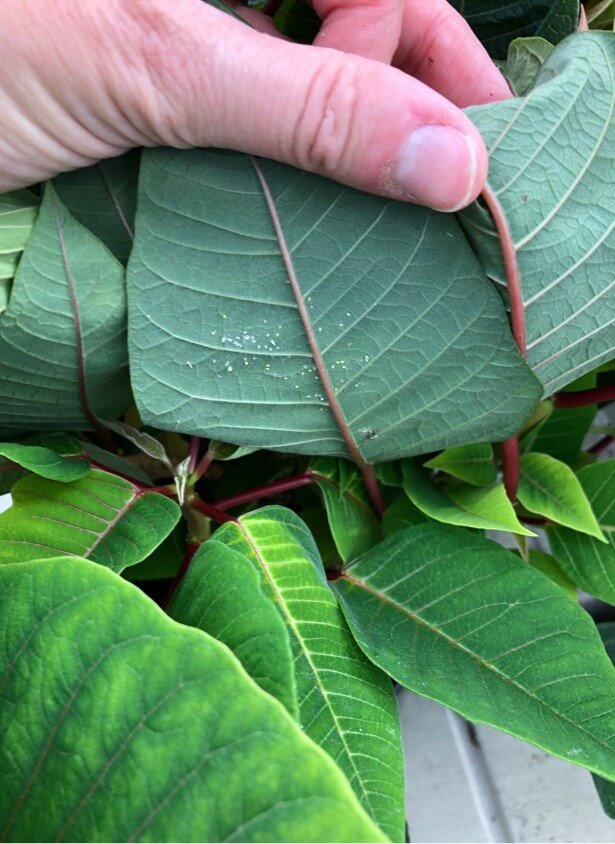
    In the following image, papers were used to diagnose coverage (from clean water) in a poinsettia greenhouse. The two papers on the right were located in the canopy and sprayed using a thermal pulse fogger and a hardware store style hand pump. The paper on the left was held directly in the path of the fogger while using the smallest nozzle provided with the unit. The spray enveloped the paper (and the person holding it). Close inspection showed tiny deposits, and the SnapCard app detected 4.5% coverage, but this greatly underestimates the actual deposition and does not account for the droplet count.

    UV dyes are the preferred method for analyzing coverage from foggers.

    Fogging and Misting Equipment

    Greenhouse spray equipment can be classified by droplet size, but also by the spray volume they employ.

    High Volume (HV)

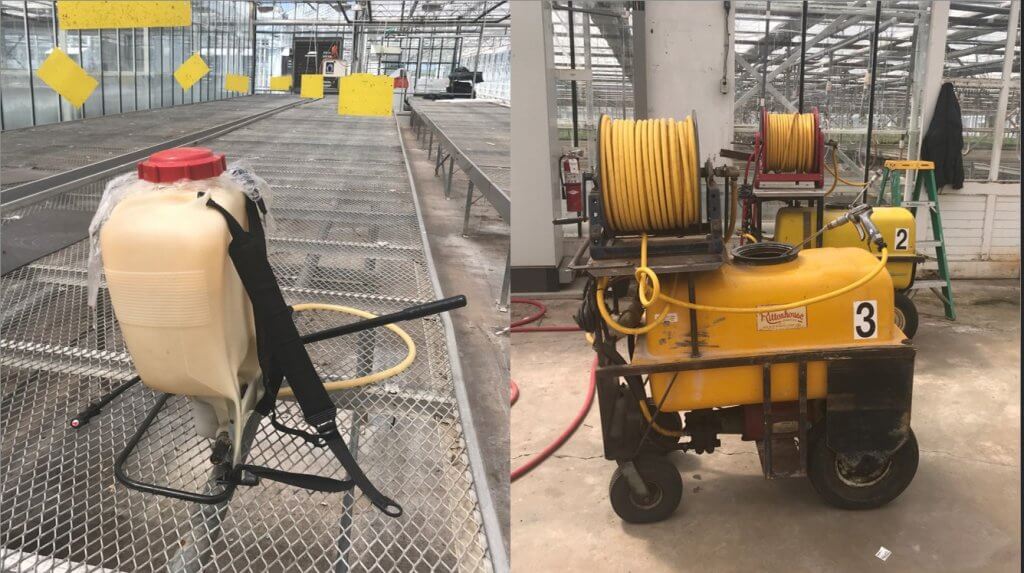
    These applications are performed at pressures ranging from 500 to 4,285 kPa (75 to 700 psi) employing flow rates of 3.9 to 5.7 L/min (1 to 1.5 US g/min). They use standard label rates to accomplish a dilute application by broadcasting droplets larger than 100 microns. The goal is to cover all surfaces without incurring run-off. Examples of HV application equipment include backpack sprayers, trailed sprayers and boom sprayers. Practice and self-calibration are necessary to achieve the desired results when using manual HV sprayers.

    Targeted Low Volume (LV)

    These applications are performed at high pressures around 20,685 kPa (3,000 psi) employing flow rates approaching 1 L/min (0.26 US g/min), covering 93 m2 (1,000 ft2). They apply reduced rates over a given area and create droplets between 25 and 100 µm. These are concentrated sprays that do not result in wet foliage. LV applications are particularly good in high-humidity environments, when it is desirable to minimize the moisture on leaves. Examples of LV application equipment include aerosol cans.

    Ultra-Low Volume (ULV)

    These applications employ flow rates approaching 2 L/min (0.52 US g/min), covering 930 m2 (10,000 ft2). They require concentrated solutions, but apply reduced rates per area using droplets less than 25 µm. ULV applications will not raise greenhouse humidity and are a good choice when days are short and nights are long. They are also an excellent way to apply disinfectants for complete space sanitation before starting a new crop. It is important to ensure vents are closed and fans are off during sanitation. Examples of ULV application equipment include total release cans, auto foggers and thermal pulse foggers.

    PulsFOG hand-held ULV cold fogger

    Thermal pulse foggers are unlike other ULV equipment and warrant special consideration. The design of the pulse fogger has remained virtually unchanged since the 1940’s. Smaller, 24 hp machines are used in smaller operations but range up to large 175 hp machines. Tank size ranges from 10 to 50 L, where 10 L should be enough to cover 4,645 m2 (50,000 ft2) in about 10 minutes, depending on crop density. Their range is about 35 m (115 ft) from the point of release.

    Thermal Pulse foggers do not create aerosol using air shear – they use combustion (80 to 100 explosions per second) to shatter spray into a fog and propel it via positive pressure. Heat is a by-product of the engine, making it an unsuitable method for applying biological products.

    However, water-cooled foggers such as Dramm’s Bio Pulse Fogger reduce the exhaust temperature below 100 °C to make the application bio-rational. This has the added advantage of making droplet sizes more consistent and preventing spray from evaporating too quickly before it diffuses to the target.

    Dramm Bio Pulse Fogger.
    Dramm Bio Pulse Fogger

    Using a Fogger

    Dramm recommends that operators use approximately 1 L of carrier in 5 L of spray mix, but a higher proportion of carrier would be required for more viscous products. Start with a full tank of clean, high grade gasoline and once the fogger has been started, run it continuously until the application is complete. Leave it running even when moving between Quonset huts (see below).

    Know when to use a pulse fogger versus an auto fogger. Auto foggers are convenient because the operator can set them and leave. However, in the case of multiple huts, it is more efficient and timely to use a thermal pulse fogger.
    Know when to use a pulse fogger versus an auto fogger. Auto foggers are convenient because the operator can set them and leave. However, in the case of multiple huts, it is more efficient and timely to use a thermal pulse fogger.

    Do not leave the manual fogger running unsupervised as an auto fogger: If they stay stationary, or aim directly at the canopy (as in hydraulic spraying), they could drench and potentially damage nearby plants.

    When fogging, aim between the plants, such as the alleys and between hanging plants. This allows the fog to expand and permeate canopies for the best coverage. When spraying is done, be sure to release the pressure created in the spray tank to prevent accidental back flow into the gasoline tank.

    And, because it’s convenient to include the math in this article, here are the formulae for calculating greenhouse volume to help you determine rates.

    Care and Maintenance

    HV, LV and ULV equipment requires model-specific cleaning and maintenance, according to manufacturer’s instructions. Even when sprayers are kept in prime condition, they are only as good as the operator’s understanding. When the wrong product is applied by the wrong machine using the wrong method, operators risk poor control, crop damage and increased potential for pesticide resistance. For more information, read the instructions that came with your sprayer, or contact the manufacturer.

    Thanks to Louis Damm and Dr. Heping Zhu for their contributions to this article.